
The n8n AI Landscape in 2026
The most cost-effective way to run AI in n8n is to standardize on one integration pattern per task type, match models to task complexity (use Haiku or GPT-4o-mini for classification, Sonnet or GPT-4o for generation), and route all calls through a cost-tracking gateway like TokenSense. Teams that follow this approach typically cut AI spend by 30–50% while maintaining output quality. This guide covers the full stack: model selection, prompt engineering for unattended automation, cost optimization patterns, and production monitoring.
n8n has become the automation platform of choice for teams that need flexibility without vendor lock-in. Its open-source core, self-hosting option, and extensible node system make it particularly popular with automation agencies and technical ops teams.
The AI integration story has matured significantly. Native AI nodes now support OpenAI, Anthropic, Google Gemini, and Mistral out of the box. The LangChain integration brings agent-based workflows, retrieval-augmented generation (RAG), and tool-calling patterns directly into the visual builder. And the trusty HTTP Request node remains the escape hatch for any provider or model not yet supported natively.
But maturity brings complexity. With five or six ways to make an AI call in n8n, teams often end up with an inconsistent patchwork: some workflows using the OpenAI node directly, others going through LangChain, others hitting APIs via HTTP Request. Each approach has different cost implications, error handling patterns, and monitoring capabilities.
The first step toward cost-effective AI in n8n is standardization. Pick one integration pattern for each task type and stick with it across workflows. This makes monitoring, cost attribution, and swapping models or providers dramatically simpler.
Choosing the Right Model for Each Task
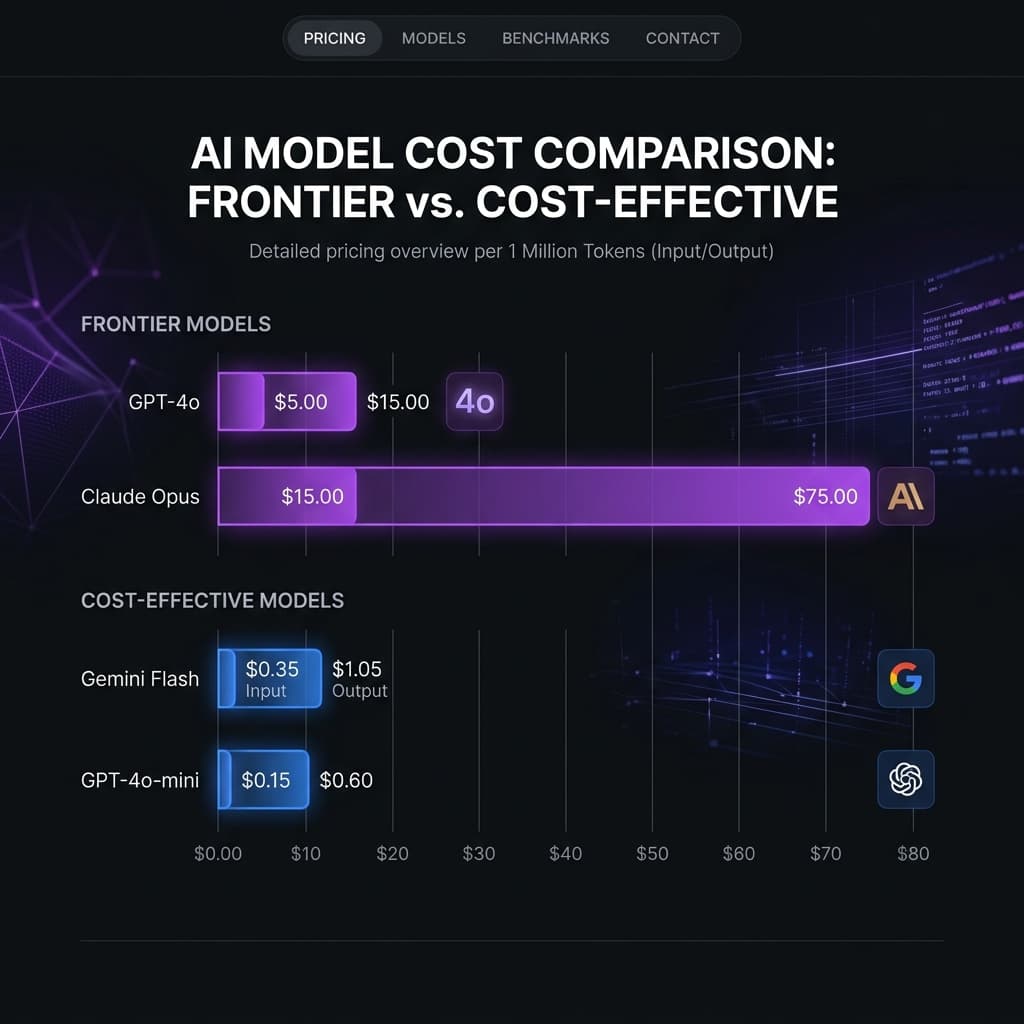
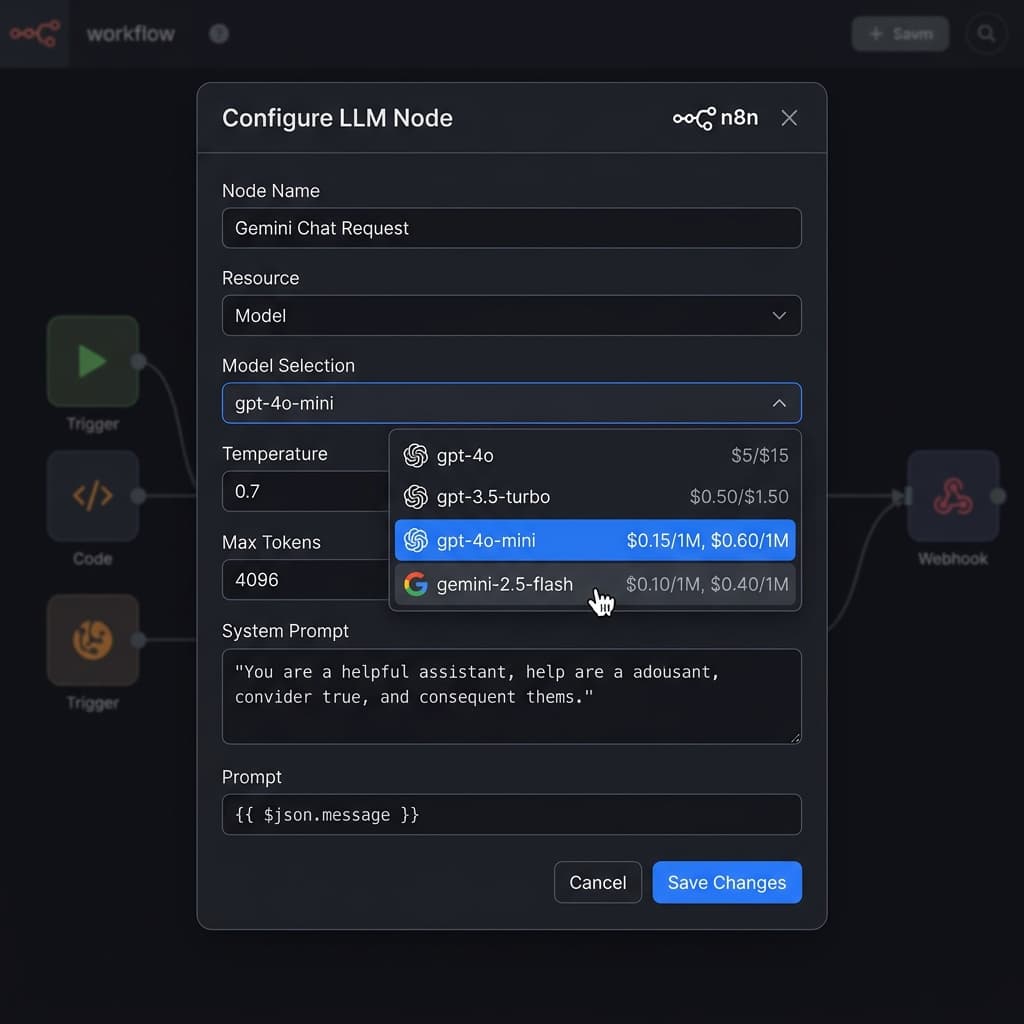
The single biggest lever for AI cost optimization is model selection. The difference between GPT-4o and GPT-4o-mini for the same prompt can be 10-15x in cost. Between GPT-4o and Claude Haiku, it's even larger.
Here's a practical framework for matching models to automation tasks:
Classification and routing (e.g., categorize a support ticket, detect intent, route a lead): Use the smallest model that maintains accuracy. Claude Haiku, GPT-4o-mini, or Gemini Flash handle these tasks with 95%+ accuracy at a fraction of the cost. Test with 100 samples before defaulting to a larger model.
Extraction and parsing (e.g., pull structured data from an email, extract entities from a document): Mid-tier models like Claude Sonnet or GPT-4o-mini excel here. The key is a well-structured prompt with clear output format — JSON schema definitions in the system prompt dramatically improve extraction reliability.
Generation and composition (e.g., write a client email, generate a report summary, create social media copy): This is where model quality matters most. Claude Sonnet or GPT-4o provide noticeably better output for creative and compositional tasks. But even here, be specific about output length — uncapped max_tokens on a generation task is the most common source of cost overruns.
Complex reasoning and analysis (e.g., analyze a contract, compare proposals, multi-step research): Reserve frontier models (Claude Opus, GPT-4o with high token limits) for tasks that genuinely require deep reasoning. These calls are 20-50x more expensive than classification calls — make sure the task warrants it.
The rule of thumb: start with the cheapest model, test accuracy on your actual data, and only upgrade when quality measurably suffers.
Prompt Engineering for Automation (Not Chat)
Most prompt engineering advice is written for chat interfaces — conversational, iterative, exploratory. Automation prompts are fundamentally different. They run unattended, thousands of times, on variable inputs. The priorities shift from "engaging conversation" to "reliable, token-efficient, structured output."
Keep prompts minimal and directive. Every extra token in your system prompt is multiplied by every execution. A 500-token system prompt running 1,000 times per day costs 500,000 input tokens daily. Trim it to 200 tokens and you've saved 60% on input costs alone. Cut preamble, remove examples that don't improve accuracy, and use terse instructions.
Demand structured output. For automation, you almost always want JSON, CSV, or a specific format — not natural language. Use the provider's structured output features: OpenAI's response_format, Anthropic's tool_use for structured extraction, or simply include a JSON schema in your prompt. Structured output is more reliable to parse and typically uses fewer output tokens than prose.
Handle edge cases in the prompt, not downstream. If your input might be empty, malformed, or in the wrong language, tell the model what to do about it in the prompt. "If the input is empty, respond with {"status": "skip", "reason": "empty input"}" is cheaper than a retry or error-handling branch.
Version your prompts. When you change a prompt, track what changed and when. A prompt update that looks minor ("added one example") can double your token count and change output behavior. Keep a changelog — even if it's just a comment in the workflow.
Cost Optimization Patterns
Beyond model selection and prompt engineering, several architectural patterns can dramatically reduce AI spend in n8n workflows:
Conditional AI calls. Not every input needs an AI step. Add an IF node before your AI call that checks whether rule-based logic can handle the case. A support ticket tagged "billing" can be routed without AI classification. A lead with a .edu email can be auto-categorized without LLM analysis. Every call you skip is money saved.
Response caching. If you're classifying or extracting from inputs that repeat (e.g., product descriptions, common email templates), cache the AI response keyed on a hash of the input. Even a simple Redis or in-memory cache can cut redundant AI calls by 30-50% in high-volume workflows.
Batching where possible. Some tasks can be batched — instead of classifying 20 items in 20 separate calls, send them in a single call with instructions to return an array. You'll pay for more tokens per call, but save on per-request overhead and reduce total token usage through shared context.
Output token limits. Always set max_tokens to the minimum needed for your task. A classification task needs 10-20 tokens, not the default 4,096. An extraction task might need 200. A summary might need 500. Leaving max_tokens uncapped is the AI equivalent of SELECT * with no LIMIT.
Off-peak processing. If your workflows aren't time-critical, consider queuing AI calls for off-peak hours when rate limits are less of a concern. This doesn't save money directly, but it reduces timeout-driven retries and keeps your workflows more reliable.
Monitoring and Debugging AI Nodes in Production
Once your workflows are in production, visibility becomes the priority. You need to answer three questions at a glance: What's it costing? Is it working? Where are the problems?
Log every AI call with metadata. At minimum, capture: timestamp, workflow ID, model used, input tokens, output tokens, cost, latency, and HTTP status. n8n's execution log captures some of this, but it doesn't calculate cost or aggregate across workflows. An AI gateway that sits between n8n and the providers can capture this automatically.
Build cost attribution into your workflow design. Tag every AI call with a client identifier and workflow name. This isn't just for billing — it's for debugging. When your monthly AI bill jumps 40%, you need to trace it to specific workflows and clients within minutes, not hours.
Set up anomaly alerts. Define what "normal" looks like for each workflow: typical cost-per-execution, expected calls-per-day, and average latency. Alert on deviations. A workflow that usually costs $0.08 per run suddenly costing $0.40 is a signal — maybe the input data changed, maybe a prompt got updated, maybe a model was swapped.
Review model performance monthly. AI providers update models regularly. Performance and pricing change. Schedule a monthly review of your model selection against current pricing and output quality. A model that was the best value six months ago might have been superseded by a cheaper, better alternative.
The goal is operational maturity: you should know your AI spend as precisely as you know your infrastructure costs, and you should be able to trace any cost anomaly to its root cause within a single dashboard session. For teams also using Zapier or Make, the same principles apply — see our Zapier and Make spend safety guide.